Stop Guessing: How to Match Your All-Sky Camera Settings to the Moon Phase for Sharper Night Sky Images
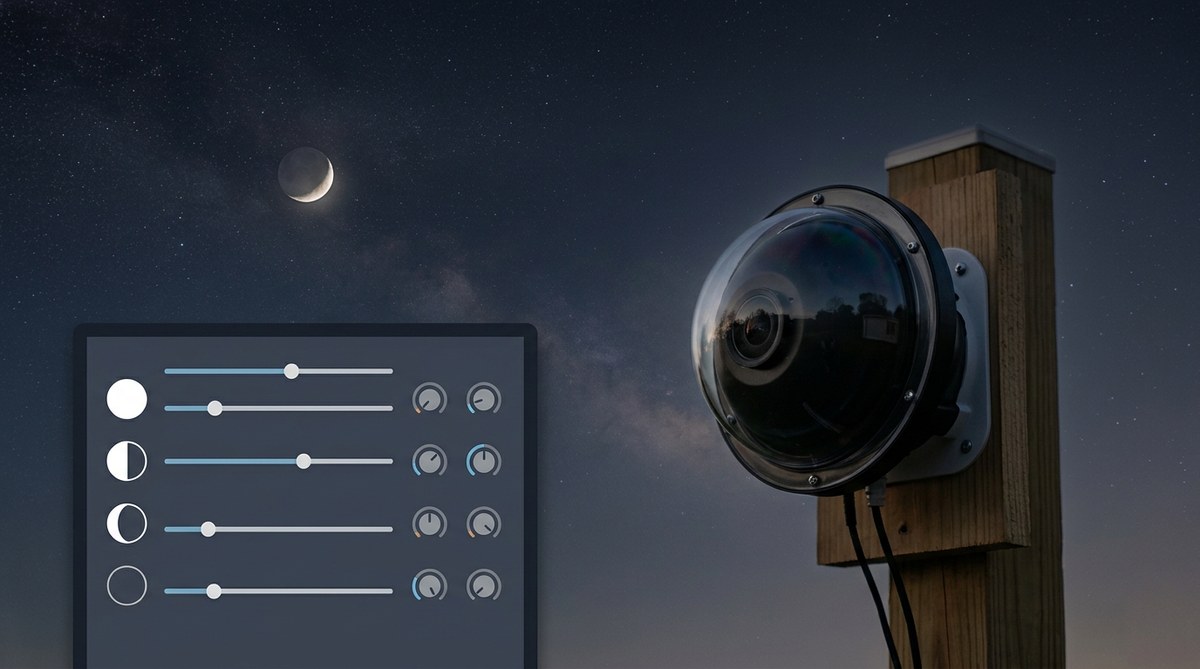
The moon is the brightest object in the night sky. It is also the most unpredictable source of light pollution for your all-sky camera. One night it is a sliver of silver hanging low. A week later it floods the entire sky dome with a wash of blue-white glow. If you leave your camera settings on one fixed value, you will end up with either a blown-out mess or a sky that looks like deep space even when the moon is half full.
Your all-sky camera needs to adapt. The good news is that the adaptation follows a predictable pattern. The moon phase tells you exactly what to do. This guide walks you through the specific settings for each phase so you can stop guessing and start capturing sharper, cleaner night sky images every single night.
Your all-sky camera settings must shift with the moon phase to avoid overexposure and loss of detail. During a new moon, use longer exposures and higher ISO to capture faint stars and meteors. As the moon waxes toward full, reduce exposure time by half or more, lower your ISO, and close the aperture slightly. The goal is to keep the sky background consistent so stars remain sharp and the Milky Way stays visible even under a bright moon.
Why the Moon Phase Changes Your Camera Settings
The amount of light the moon reflects back to Earth changes dramatically over 29.5 days. A new moon adds almost zero extra light to the sky. A full moon can increase sky brightness by a factor of 100 or more. Your all-sky camera has a fixed field of view that covers the entire dome. It cannot zoom in to avoid the moon. It must capture whatever light is present, including the moon’s glow.
If you use new moon settings during a full moon, the image will be completely washed out. Stars near the horizon will disappear. The sky will look like a gray fog. If you use full moon settings during a new moon, the image will be too dark. Faint meteors and dim stars will not register.
The solution is a settings table you can adjust by phase. Once you learn the pattern, you can even automate the changes through your observatory control software.
The Four Key Settings You Will Adjust
Before we get into the phase-by-phase numbers, let us define what we are actually changing. These four settings are the levers you pull.
- Exposure time (shutter speed): How long the sensor collects light. Measured in seconds.
- ISO (gain): How much the signal is amplified. Higher ISO makes the image brighter but adds noise.
- Aperture (f-stop): How wide the lens opens. On most all-sky cameras this is fixed, but some allow adjustment.
- Gain or brightness offset: A digital boost some camera firmware offers. Use it sparingly.
The table below shows the relationship between moon illumination and these settings. Illumination is the percentage of the moon’s visible surface that is lit. You can look up the current illumination on any astronomy app.
| Moon illumination | Exposure time (seconds) | ISO | Aperture (f-stop) | Notes |
|---|---|---|---|---|
| 0% to 10% (new moon) | 25 to 30 | 1600 to 3200 | f/1.4 to f/2.0 | Maximum sensitivity for faint objects |
| 10% to 40% (waxing crescent) | 15 to 20 | 800 to 1600 | f/2.0 to f/2.8 | Reduce exposure by about one third |
| 40% to 70% (first quarter to gibbous) | 8 to 12 | 400 to 800 | f/2.8 to f/4.0 | Moon glow starts to dominate |
| 70% to 100% (waxing gibbous to full) | 4 to 8 | 200 to 400 | f/4.0 to f/5.6 | Strongly reduce exposure |
| 100% (full moon) | 2 to 4 | 100 to 200 | f/5.6 to f/8.0 | Minimum exposure, maximum aperture reduction |
These are starting points. Your specific camera sensor, lens, and local light pollution will shift these numbers. The important thing is the ratio. As the moon gets brighter, you cut exposure and ISO by roughly half each time.
A Step-by-Step Process for Each Night
You do not need to memorize every number. Use this simple process each evening before your all-sky camera starts its run.
- Look up the current moon illumination percentage. Many free apps like Stellarium or PhotoPills give you this number instantly. You can also check the US Naval Observatory website.
- Find the matching row in the table above. If the illumination is 55%, you are in the 40% to 70% band. Start with 10 seconds at ISO 800.
- Take a test frame. Look at the image on your computer screen. Check the histogram if your software shows it. The sky background should be a dark gray, not black and not white.
- Adjust one setting at a time. If the image is too bright, reduce exposure time first. If it is still too bright, lower ISO. If the stars look bloated, close the aperture slightly.
- Lock in the settings and let the camera run. Check the first few frames of the night to make sure conditions have not changed. Clouds or haze can scatter moonlight and make the sky brighter.
“The single biggest mistake I see in all-sky camera setups is treating every night the same. The moon does not care about your routine. You have to match it.” – Veteran remote observatory operator from the JAT Observatory team.
Common Mistakes and How to Fix Them
Even experienced astrophotographers make these errors. Here are the most frequent problems and the direct fix.
- Using auto-exposure mode. All-sky cameras that automatically adjust exposure will chase the moon’s brightness. This causes the exposure to change wildly between frames. Stars will appear and disappear. Meteors will be cut off mid-frame. Always use manual exposure.
- Setting ISO too high on a bright moon. High ISO amplifies the moonlight just as much as it amplifies starlight. You end up with a noisy, blown-out image. Lower ISO first, then adjust exposure.
- Forgetting to check the moon’s altitude. A full moon at zenith is much brighter than a full moon near the horizon. If the moon is low, you can sometimes use settings from the 70% to 100% band even at full moon. If it is high, use the full moon row.
- Ignoring light pollution from the moon. Even a crescent moon adds light scatter in humid or hazy conditions. If your sky looks milky, reduce exposure by another 2 seconds regardless of the table.
When the Moon Is Not the Only Problem
Sometimes the moon phase is not the dominant factor. If you live in a suburban area with significant light pollution, the sky background may already be bright even on a new moon. In that case, your all-sky camera settings for a new moon might look closer to the first quarter row. The table is a starting guide, not a rigid rule.
You can read more about how to handle these variables in our guide on building an all-sky camera system to monitor celestial patterns year-round. That article covers the hardware choices that give you more flexibility when the sky conditions change.
Automating the Adjustment
If you run a remote observatory, you do not want to change settings by hand every night. The good news is that most all-sky camera software allows scripting. You can write a simple script that reads the current moon illumination from an online API and applies the correct settings automatically.
Here is a basic logic flow for your automation script.
- Fetch the current moon phase percentage from an API like the USNO or a local weather service.
- If illumination is less than 10%, apply new moon profile.
- If illumination is between 10% and 40%, apply crescent profile.
- If illumination is between 40% and 70%, apply gibbous profile.
- If illumination is greater than 70%, apply bright moon profile.
- Log the applied settings and the moon phase for your records.
This approach removes all guesswork. Your camera will always be in the right ballpark. You can then fine-tune manually during the first test frame of the night.
For more advanced automation ideas, check out our article on 7 essential automation scripts every remote observatory operator needs. It includes ready-to-use code snippets for several popular camera platforms.
The Role of the Moon in Astrological Observation
Many users of all-sky cameras also follow astrological patterns. The moon’s phase has deep significance in astrological traditions. A new moon is a time for new beginnings. A full moon is a time for culmination. When you capture sharp images of the sky during these phases, you are also documenting the energy that astrologers talk about.
If you want to align your photography with astrological events, consider pairing your settings with a tracking system. Our guide on how to use your all-sky camera to track astrological transits shows you how to tag your images with zodiac positions and moon phase data automatically. This turns your camera into a tool for both science and personal reflection.
Putting It All Together for Sharper Images
The goal is consistency. When you match your all-sky camera settings to the moon phase, every image in your archive will have a similar sky background. That makes it easier to compare nights, spot meteors, and create time-lapse sequences that do not flicker.
Start tonight. Look up the moon phase. Pull up the table in this guide. Take one test frame. Adjust. Then let the camera run. Within a week, the habit will feel natural. Within a month, you will wonder why you ever left your camera on a single setting.
For a deeper look at how lunar illumination affects your entire observatory workflow, read our post on tracking the moon’s phases a practical observer’s guide to lunar influence claims. It covers the historical and observational side of lunar cycles.
And if you are still building or upgrading your setup, our all-sky camera setup complete guide from hardware to first light will walk you through every component.
The moon does not have to be your enemy. It is a tool. Learn to read it, and your all-sky camera will reward you with sharper, more beautiful night sky images every single night of the year.

Post Comment