Essential Lightning Protection for Remote Observatory Equipment
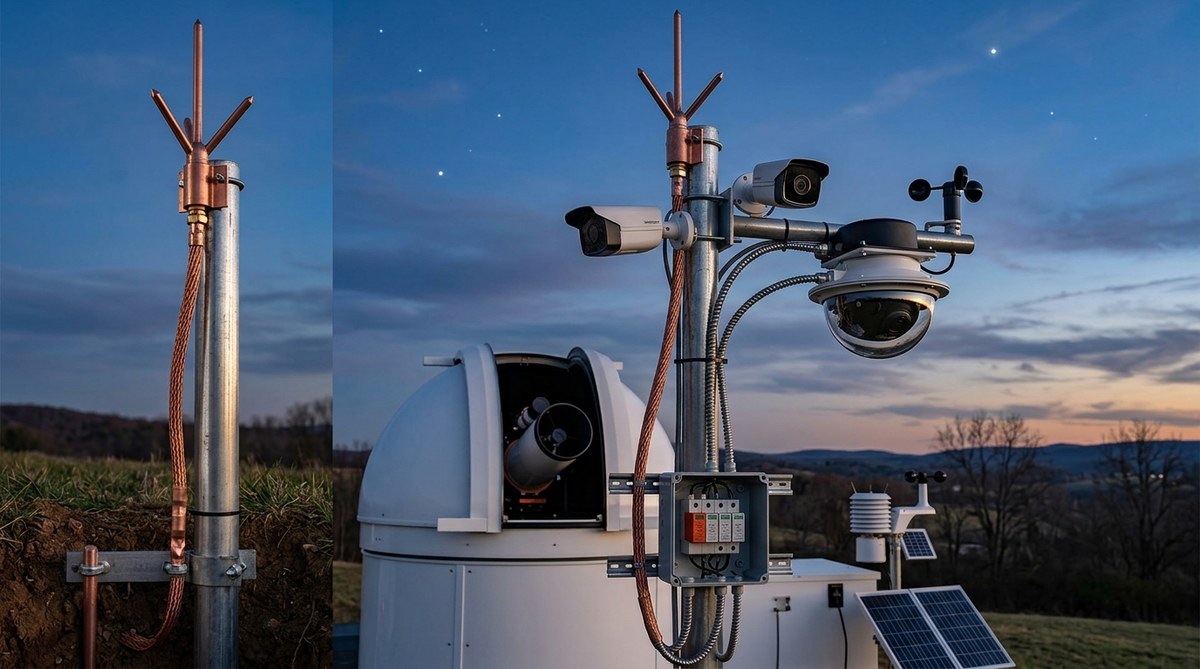
You spent months carefully aligning your telescope, dialing in the autoguider, and running cables to that perfect dark site. Your remote observatory captures stunning images of Andromeda, tracks planetary retrogrades, and logs meteor showers while you sleep. Then a spring thunderstorm rolls through, and one direct strike or nearby surge wipes out your camera, mount, and computer in an instant. Lightning protection for remote observatory gear is not optional. It is the difference between a season of lost data and years of uninterrupted stargazing.
A complete lightning protection system for a remote observatory requires three layers: a properly driven ground rod, whole-structure surge arrestors on power and data lines, and secondary surge protectors at each device. Without all three, even a nearby strike can destroy thousands of dollars of astronomy gear. DIY installation is possible if you follow local electrical codes and test your ground resistance.
Why your remote setup is a lightning magnet
Remote observatories sit in open fields or on hilltops. That makes them ideal for dark skies but also prime targets for lightning. A single strike can travel through Ethernet cables, power lines, or even coax from your all-sky camera. The result is fried circuit boards, dead motors, and corrupted hard drives. If you are running an automated system that captures astrological events like retrogrades or lunar occultations, a lightning strike can wipe out months of scheduled observations.
The physics is simple: lightning wants the path of least resistance to ground. Your observatory’s metal pier, steel dome, or even the copper traces on your camera PCB can become that path. Without proper grounding, the surge pushes backward through every connected device.
The three pillars of observatory lightning protection
You need protection at three points. Skimp on any one, and you are still vulnerable.
| Protection Layer | What It Does | Common Mistake |
|---|---|---|
| Ground electrode system | Provides a low-resistance path for lightning current to dissipate into the earth | Only using a short ground rod or no rod at all |
| Whole-structure surge protector | Clamps voltage spikes coming in on the main power line | Installing a cheap power strip instead of a UL-listed surge arrestor |
| Point-of-use surge protectors | Protects individual devices like cameras, mounts, and computers | Forgetting data line surge protection for Ethernet or USB |
Grounding: the foundation
Drive at least one eight-foot copper-clad ground rod into the earth near your observatory. Connect it to your equipment ground bus with a heavy gauge copper wire (at least #6 AWG). Bond it to your utility ground if you have mains power. If you are running off solar, ground the battery bank negative terminal to the same rod.
A single rod may not achieve the National Electrical Code’s recommended 25 ohms or less. In dry or rocky soil, install two rods spaced at least six feet apart and connect them together. Measure resistance with a ground tester. Under 10 ohms is ideal for lightning protection.
“I ignored grounding for two years because I thought the dome would divert strikes. One July storm proved me wrong. The strike hit a tree 30 feet away, but the induced surge still blew the Ethernet ports on my mount and camera. A properly grounded system with data surge protectors would have saved me $3,000 in repairs.”
Tom R., remote observatory operator in Colorado
Surge protection on every cable
Install a Type 1 or Type 2 surge arrestor on the main AC power panel feeding your observatory. Then add a secondary surge protector at each device. Do not forget data lines. An Ethernet surge protector between your camera and the switch can stop a surge before it reaches the motherboard. Many amateurs use a midspan injector with built-in surge protection for PoE cameras.
For coax cables (if you use a weather station or cam), install gas tube surge protectors grounded to the same rod. For USB runs, inline USB isolators with surge clamping are available. Every wire entering the building is a potential lightning highway.
Step-by-step installation process
Follow these steps to protect your remote observatory. Adjust for your specific setup, but the principles are universal.
- Choose a location for the ground rod within five feet of your observatory structure. If you are on a concrete pad, drill a hole or drive the rod next to the foundation. Never attach the ground wire to a water pipe or gas line.
- Drive the rod using a ground rod driver or a rotary hammer with a rod driver attachment. Drive it flush with the ground or slightly below. Use a coupling for extensions if needed.
- Connect the ground conductor from the rod to your equipment ground bus. Use a bronze acorn clamp for the rod connection. Run the copper wire in a PVC conduit for physical protection.
- Install a whole-structure surge protector at the main breaker panel. Follow the manufacturer’s instructions. This device goes between the hot/neutral and ground.
- Add point-of-use surge protectors for your telescope mount, camera, computer, and any peripherals. Use a quality rack-mount UPS as well. it doubles as surge protection and clean power.
- Protect data lines. Install inline Ethernet surge protectors on every cable that leaves the observatory or runs between buildings. Ground them to the same bus.
- Bond all metal parts: the dome, pier, tripod legs, and equipment racks. Use #6 or larger copper wire to connect them to the ground bus. This prevents side flashes.
- Test ground resistance with a ground resistance meter. If it is above 25 ohms, add more rods or treat the soil with conductive material.
- Label your system and draw a simple diagram. Store it with your observatory docs for future reference or resale.
- Test your surge protectors annually. Many have indicator lights that show when the protection element is fried. Replace them immediately if damaged.
Common mistakes that leave your gear exposed
- Using a cheap power strip as the only surge protection. Power strips only protect against small spikes, not lightning surges.
- Running Ethernet cables outside without surge protection at both ends.
- Bonding equipment to a separate ground rod that is not tied to the utility ground. This creates a dangerous ground loop.
- Forgetting to protect phone line or satellite dish cables if you use them for remote access.
- Installing surge protectors but not grounding them properly. A surge protector without a good ground is useless.
- Ignoring local electrical codes. In many US counties, you need a permit for ground rod installation.
Budget-friendly options for hobbyists
You do not need a professional grounding contractor for a small backyard observatory. A single ground rod, a few feet of #6 copper wire, and a pair of inline surge protectors for Ethernet can cost under $200. For a few hundred more, add a whole-house surge arrestor.
If you are building a weatherproof enclosure for remote observatory equipment on a budget, incorporate a ground rod and bus early. It is much harder to add later. Also check out our guide on 5 essential power management solutions for unattended remote observatories for ways to integrate surge protection into your power backup plan.
How to maintain your lightning protection system
Test your ground rod resistance every spring before thunderstorm season. Inspect all connections for corrosion or loose clamps. Replace surge protectors that have taken hits (the indicator light will be off or red on most models). After a nearby lightning event, check every device for unusual behavior. Even if nothing is obviously broken, a surge can degrade components, causing intermittent failures months later.
Keep a log of maintenance and any storms that hit your area. This helps when troubleshooting later or talking to an insurance adjuster.
Protecting your gear means protecting your passion
Whether you are photographing the Geminid meteor shower or tracking a rare planetary retrograde for an astrological project, your remote observatory is a tool that takes time, money, and care to build. Lightning protection is the least glamorous part of the setup, but it is the one that keeps your equipment alive season after season. Install a proper grounding system. Add surge protectors to every cable. Test it yearly. Then sleep soundly through every thunderstorm, knowing your telescope will still be there at dawn, ready to capture the next celestial event.

Post Comment