How to Automate Your Observatory’s Image Processing Pipeline Using Free Software
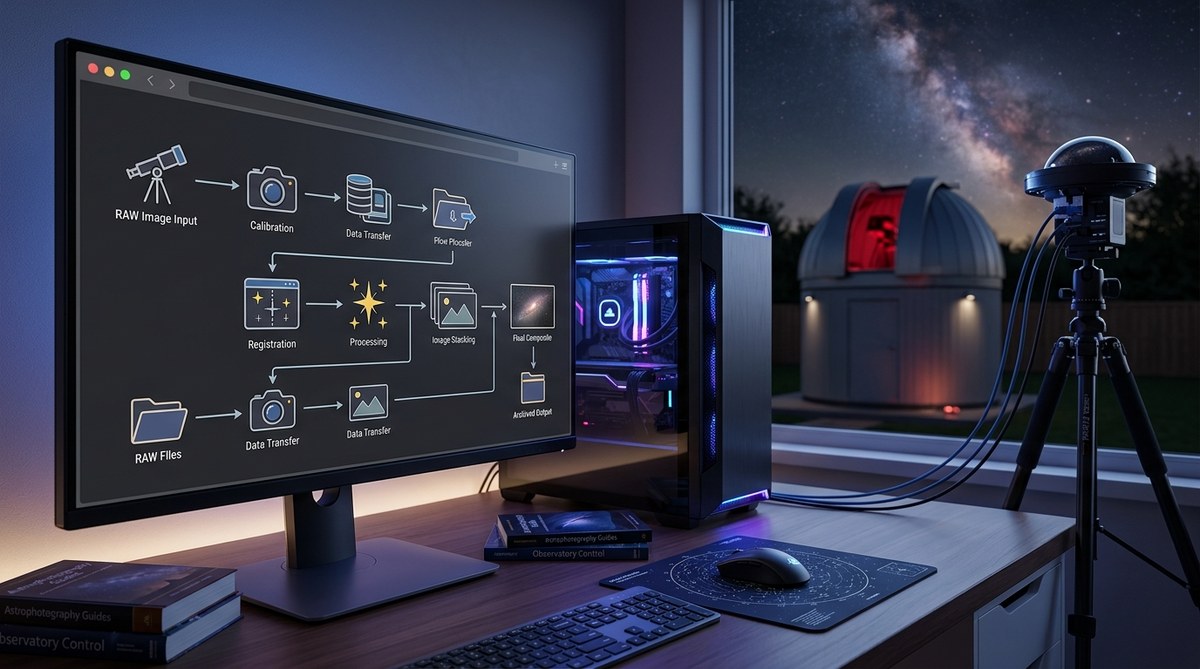
For the first few years of running my backyard observatory, image processing felt like a second job. I would wake up early, download raw frames, calibrate them manually, stack, stretch, and then realize I forgot a flat field. Repeat. It was exhausting. Then I discovered that the same tools astronomers use on million-dollar telescopes are completely free. With a little scripting, you can build an automated observatory image processing pipeline that runs while you sleep.
By combining free software like Siril, Python, and INDI, you can automate calibration, registration, stacking, and even post-processing. This guide walks you through building a pipeline that saves hours per session, reduces errors, and lets you focus on capturing more data instead of wrestling with menus.
Why Bother Automating Your Image Processing?
Every amateur astronomer knows the feeling: a perfect night of clear skies, dozens of subs, and then the mountain of manual work. Automation fixes that. It does not mean you lose creative control. It means you hand over the repetitive, rule-based tasks to a script. You get consistent results, fewer missed flats, and more time to actually enjoy astronomy.
For example, I used to spend about 45 minutes just calibrating and stacking a single target. Now my pipeline does that in 15 minutes, and I can queue up three targets overnight. That is a massive productivity gain.
The Core Components of an Automated Pipeline
Before we get into the code, you need to understand the building blocks:
- Image acquisition: INDI-based drivers or ASCOM through a free wrapper.
- Calibration files: darks, flats, bias. Your pipeline must capture them automatically or at least know where they live.
- Preprocessing: subtract bias, apply darks, divide by flats. Siril does this well.
- Registration: align all frames to a reference star.
- Stacking: combine into a master file.
- Post-processing: stretch, background extraction, star removal, color calibration.
- Scheduling and monitoring: Cron jobs, systemd timers, or a dedicated scheduler like
NINA(free for Windows) orEkos(part of KStars, free on Linux).
For a fully free pipeline, I recommend pairing Ekos (for acquisition) with Siril (for processing) and a few custom Python scripts.
Step-by-Step: Building Your Automated Pipeline
Let me walk you through a practical setup. This assumes you have a Linux machine (a Raspberry Pi 4 or 5 works well) or are willing to install a virtual machine. But the same logic applies to Windows if you use Siril’s command-line interface and batch files.
-
Set up Ekos to capture your sequences. Define a sequence that takes lights, darks, flats, and bias. Make sure Ekos places each type in a separate folder. Name the folders with a date-time stamp to avoid collisions.
-
Write a post-capture script. In Ekos, you can trigger a custom script after each sequence finishes. That script should call Siril in headless mode. For example:
- Step 1: Copy raw files to a working directory.
-
Step 2: Run
siril -s preprocess.txtwherepreprocess.txtcontains commands likecalibrate light,register, andstack. -
Automate the Siril script generation. Instead of hardcoding paths, have a Python script read the folder structure and build the Siril command file. This script can also verify that you have enough flats and darks (minimum 20 each is a safe bet).
-
Handle failures gracefully. Your pipeline should email you or send a push notification if something goes wrong. A simple
curlto a webhook or a local script that texts you via Twilio costs pennies. -
Schedule automatic flat field acquisition. Many observatory owners forget flats until the morning. Program your roof or flat panel to open at dawn and take a set of twilight flats. Why your observatory needs automated flat field calibration explains the importance in detail.
-
Queue multiple targets. Using Ekos’s scheduler, you can add several targets for one night. The pipeline will process each one separately after capture, stacking only the relevant subs.
-
Archive and rename output files. A final script can move the master stack to a folder named after the target and date, ready for later stretching in GIMP or Photoshop.
Free Software Stack That Actually Works
Here is my current toolbox, all free as in beer and speech:
- Siril – The workhorse. Handles calibration, registration, stacking, and basic stretching. Its scripting language is surprisingly powerful.
- Python – For glue logic, folder management, and sending notifications. The
astroplanandastropylibraries help with target coordinates. - INDI / Ekos – Controls your mount, camera, focuser, and dome. Runs on any Linux box.
- KStars – Planetarium and scheduler. You can schedule an entire night’s automation without touching the keyboard.
- GIMP – For final artistic touches. You can script GIMP with Scheme or Python as well.
- cron or systemd timers – Ensure your pipeline runs even if you forget to start it.
If you prefer a fully integrated environment, Can INDI drivers really replace proprietary telescope software? offers a direct comparison.
Common Automation Pitfalls (and How to Avoid Them)
Even the best pipeline can break. Here are mistakes I made, so you do not have to:
| Mistake | Consequence | Fix |
|---|---|---|
| Not testing the pipeline during daytime | First night’s data is lost | Run a full dry run with a test target (e.g., M42 in summer) |
| Using the wrong calibration set for the temperature | Residual gradient in stacked image | Record camera temperature in the FITS header and match darks by temperature |
| Forgetting to update the flat field master after moving the focuser | Rings or shadows in final image | Automate a new flat master every night if the focuser moves |
| Hardcoding file paths | Scripts break after a software update | Use environment variables or a config file |
| Not logging errors | You wake up to an empty folder | Add verbose logging and send logs to a remote server or email |
Another tip: if you use Windows, watch out for the fact that Siril’s command line on Windows still works but requires a different path syntax. Many remote observatory operators stick with Linux for stability.
Expert Advice from a Seasoned Automator
“The biggest time saver for me was not the stacking itself but the calibration step. I used to spend ten minutes per night manually renaming flat files. Now a cron job runs a Python script that copies the latest flat master, registers it in Siril, and deletes the old one. It took two hours to set up, and now it runs forever without complaints.” – Tom B., operator of a remote observatory in Arizona
Tom’s point is key: the initial investment pays for itself after three or four nights. You do not need to be a programming wizard. Copy, paste, and tweak the example scripts that come with these programs. The community has already solved most of the edge cases.
For more concrete automation ideas, check out 5 essential scripts every remote observatory owner should be running. They include a script to monitor disk space and delete old raw frames after stacking, which is a lifesaver.
Scheduling and Monitoring: Letting the Machine Do the Work
Once your pipeline is built, you need to schedule it. On Linux, use crontab -e and add a line like:
0 6 * * * /home/obs/process_last_night.sh
This runs your processing script at 6 AM every day. I also have a second cron job that checks if the weather was clear the previous night (using a local weather API) and only runs the pipeline if the sky was clear. That prevents useless processing of cloudy data.
For monitoring, I use a simple Python script that pings the processing server every 30 minutes. If the pipeline hangs, it restarts the service. You can also set up a Telegram bot to send you a message with a thumbnail of the stacked image. That way you know immediately if something went wrong.
If you are interested in integrating astrological events into your automation, you can schedule captures for specific lunar phases or planetary alignments. For example, Three planetary retrogrades captured by our observatory that will reshape your astrological outlook shows how we timed our automated runs to catch retrograde motion.
From Exhaustion to Efficiency: Your Automated Future
Building an automated image processing pipeline does not just save time. It gives you back the joy of astronomy. You wake up to a ready-to-stretch image instead of a pile of raw files. You can spend your evening actually looking at the sky or discussing results with fellow observers. And because the pipeline is consistent, you will produce better images over time.
Start small. Choose one target, build the script, run it manually first, then add cron. Within a week you will wonder how you ever lived without it.
So tonight, after you close the observatory roof, let the machine do the processing. You have earned that cup of coffee in the morning, with an image already waiting for you.

Post Comment